
💡 If you have problems with CF, use
/cf-helpto get help or ask in the GitHub Discussions.
✨ Latest changes
plugin v0.43.52026-09-17
- Fix
cf-review's enforced deadline on hosts with GNUtimeout(1)(Linux): a reviewer that ignoredTERMreportederror … exited 137instead oftimeout, a reviewer killed by a signal lost its128+Nexit code, and cancelling a review orphaned the agent CLI instead of stopping it #beaccd87
plugin v0.43.42026-09-17
cf-review: single scope snapshot shared between gather and assess, flat 1/1/2 reviewer graph with explicit completion status, and enforced per-reviewer timeouts (review.agentTimeout/review.nativeTimeout, defaults 300s/600s) that gate commits when a review doesn't finish in time #f623127b #1adbe558 #289d1015 #139c1de8- Fix
cf-plan-reviewto embed supporting plan files directly in the review prompt #5eb39ef7
Coding Friend adds skills, agents, and hooks to the tools you already use. You get plan → implement → review → commit, with project knowledge in docs/ and learning notes in ~/.coding-friend/learn/. A memory system runs underneath, along with useful hooks and mechanisms to protect your privacy and security.

harness only
without cf
You can only rely on the harness and default settings of the tool you’re using, or sometimes no harness at all. Even small tool changes can affect your usual workflow without you noticing.
standards · memory
with cf
Besides the harness for the tool you’re using, CF suggests best-practice standards for daily workflows—from planning and code reviews to bug fixes, research, and optimization. CF also includes a memory system that helps agents avoid spending too many tokens on topics they’ve worked on before. You can also build a learning hub for readers as you work with CF; the system will help summarize everything and turn it into a polished website.
🤝 Supported Tools
Coding Friend installs on the host you already use.
| Host | Support | Command | Notes |
|---|---|---|---|
| Claude Code | 100% | cf install | Default. |
| oh-my-pi | 95% | cf install --agent omp | Beta. Skills come from the Claude plugin cache. |
| Codex | 77% | cf install --agent codex | Beta. Invoke as $cf-*. Partial hooks and auto-approve. |
| Antigravity | 73% | cf install --agent agy | Beta. Requires agy >= 1.1.0. No memory auto-capture. |
| Cursor | 100% | comes with Claude | Runs Claude Code / Codex underneath. |
| Grok Build | 100% | comes with Claude | Same as Cursor. |
| ZCode | 100% | via github marketplace | not tested 100% |
% = Claude is a baseline with all skills, agents, hooks. Some are Claude only: statusline, session save/restore (/cf-session), and task tracking. Other hosts ship their own equivalents, so they are not counted.
📦 Install
You need Node 20+ and a supported host.
npm i -g coding-friend-cli
# If `cf` is taken, use `cdf`

cf install               # Claude Code (default)
cf install --agent codex # or 'omp', 'agy'

cf init                  # per project: docs/, .coding-friend/config.json
cf update                # later: pull the newest plugin

# Need help?
cf help

# Get Started in any project
cf init
Scope with --user | --project | --local. Host aliases: --codex / --omp / --agy. Then use /cf-help inside your agent to ask anything about CF.
After cf init or working with CF, a folder docs/ is created inside your project with nested folders for plans, memory, research, reviews,... and more.
Manual install
plugin marketplace add dinhanhthi/coding-friend
plugin install coding-friend@coding-friend-marketplace
Or ask your agent to install it.
✨ Features
Skills are slash commands (/cf-*) or auto-invoked when a matching situation appears. Settings that live in config.json — run cf config and follow the instructions there. To extend a built-in skill, see Custom Guides.
🔁 Workflow
You plan, implement, review, commit, then ship. Bugs loop through /cf-fix and cf-sys-debug.

🗺️ Plan & build
-
/cf-plan(source) — Brainstorms with you, then writes a phased plan underdocs/plans/<plan-name>/(plusbrief.mdwith the original request and Q&A in normal/hard mode). Under the hood:cf-explorermaps the repo,cf-plannercompares approaches, thencf-implementerruns each task. Available modes:- (none) — normal: full workflow, writes the plan file
--fast/--quick— skip discovery and the planner; plan stays in chat, no file. If the plan turns multi-phase it switches to normal and writes the file. Combined with--auto, the file is always written--hard— extra discovery plus rollback planning--auto— after approval, run every phase (review, fix Critical/Important, commit) with no prompts; combines with any mode--inline/--no-file— plan in chat only, no file; cannot combine with--auto--model <alias>— pincf-planner(opus/sonnet/haiku/fable); ignored in fast--gui/--human— also write a human overview doc (off by default). To turn that doc on for every run, usecf config--add-tests/--tdd— not a plan mode; forwarded to everycf-implementerso each task uses TDD. Without it, implementers write code with no new tests
Example output:
Progress | Status | Phase | Tasks | | -------------- | ----------------- | ------- | | ✅ DONE | Phase 1: Teardown | 3 tasks | | 🔄 IN PROGRESS | Phase 4: Content | 6 tasks | | ⬜ TODO | Phase 5: Merge | 1 task | #### Phase 1 [sequential] -
/cf-plan-resume(source) — Reloads a saved plan and its context file, skips DONE tasks, re-runs the rest via the same execute protocol. If the plan hasauto: trueand anAUTOPILOTsection, it continues in autopilot. -
/cf-plan-review(source) — Reviews a saved plan folder with a fresh in-session reviewer before you implement it;--codex/--gemini/--claude/--cursor/--grokadd external reviewers in parallel and merge. Writesreview.mdnext to the plan and offers to apply Critical/Important findings. -
/cf-advise(source) — Interviews one question at a time, then a verdict-first recommendation with pitfalls and ranked alternatives. Never writes code or a plan. Flags:--quick/--fast(2–3 questions),--save(write todocs/memory/decisions/). -
/cf-design(beta) (source) — Makes new or changed UI match the project's existing look. The first word of the argument picks the mode (empty → it asks which one):scan [path]— read existing UI files, extract colors / type / spacing / components, writedocs/DESIGN.md[description]— implement new UI from that description, usingdocs/DESIGN.md(or a fresh scan) as the basemodify [what] -- [how]— change one element and keep it consistent with the rest of the project
-
/cf-optimize(source) — Detects available profilers, measures a baseline, changes one thing, re-measures, compares.
🐛 Fix & debug
-
/cf-fix(source) — Reproduces the bug, searches past bug docs, explores, fixes, verifies, then reviews. Escalates hard bugs tocf-sys-debug.--add-tests(or--tdd) writes a failing test first when none exists.Example output:
> ✨ **CODING FRIEND** → /cf-fix activated Root cause: [what was wrong, file:line] Fix: [what changed, file:line] Confirmed: [evidence or test that proves the fix] Tests: [pass/fail count, regression test location] Status: DONE -
cf-sys-debug(source) — Four phases: state a file:line hypothesis before touching code, test it, apply a regression-guarded fix, write a bug doc. Auto-invoked for recurring or unclear bugs. -
cf-tdd(source) — Auto-loaded before production code. Direct mode (default) writes no new tests. TDD mode is--add-testsor--tdd, ortdd: trueviacf config.--autothen reviews, fixes Critical/Important, and commits. -
cf-verification(source) — Auto-invoked after code changes. Runs tests / build / lint, shows the output, and blocks a "done" claim without evidence.
🚀 Review & ship
-
/cf-review(source) — Gathers the diff into one snapshot, then hands it tocf-reviewer, which covers all five layers itself (project rules, plan alignment, correctness, security, tests). Depth is auto QUICK / STANDARD / DEEP from change size, or--quick/--deep, and it sets how many reviewers run: 1 in QUICK, 1 in STANDARD, 2 in DEEP (cf-reviewer-securityjoins in parallel). External reviewers are opt-in extras counted separately from those:--with-codex/--codex,--claude,--gemini,--cursor,--grokrun in parallel and merge into the same report.--outwrites a/cf-review-outprompt with the in-session findings (cannot combine with those agent flags). Codex-as-default:cf config. The two timeouts are different mechanisms:review.nativeTimeout(600s) is a cooperative budget an in-session reviewer is asked to keep (a running in-session job can only be cancelled when the host offers a cancel), whilereview.agentTimeout(300s) is really enforced on the external reviewer's subprocess. Every report ends withReview status: COMPLETE | PARTIAL | FAILED; COMPLETE means the required coverage finished, not that there were no findings, and PARTIAL or FAILED stops an autopilot commit. This is a trade-off, not a free win: one generalist covering five layers in a pass reviews each layer differently than five specialists each owning one, socf-reviewer-plan,-quality,-tests,-rules, and-reducerstay directly callable when a layer deserves its own pass.Example output:
🚨 Critical - None. ⚠️ Important - None. 💡 Suggestions - None. 📋 Summary No blocking issues found. You're clear to commit. Review status: COMPLETE -
/cf-review-out(source) — Writes a self-contained prompt + diff todocs/reviews/for any external AI or a human. -
/cf-review-in(source) — Reads that result file, presents findings, offers to fix. -
/cf-commit(source) — Analyzes the diff, soft-review check, conventional commit focused on why. -
/cf-ship(source) — Verify → commit → push → PR.--dry-runsimulates and does not commit, push, or open a PR. Custom Before guides run first (for example a version bump).

💡 Knowledge
/cf-ask(source) — Explores the codebase (cf-explorer), answers a focused question, saves the Q&A todocs/memory/./cf-scan(source) — Token-heavy project scan; writes architecture, conventions, and stack into memory (updates, does not duplicate)./cf-remember(source) — Extracts conversation knowledge intodocs/memory/(bugs, decisions, conventions, features) for later AI recall. Also auto-invoked./cf-learn(source) — Writes educational notes for you (default~/.coding-friend/learn/). Host withcf learn hostor share withcf mcp. Output, language, and related settings:cf config. Runcf learn hostand you get a site like this: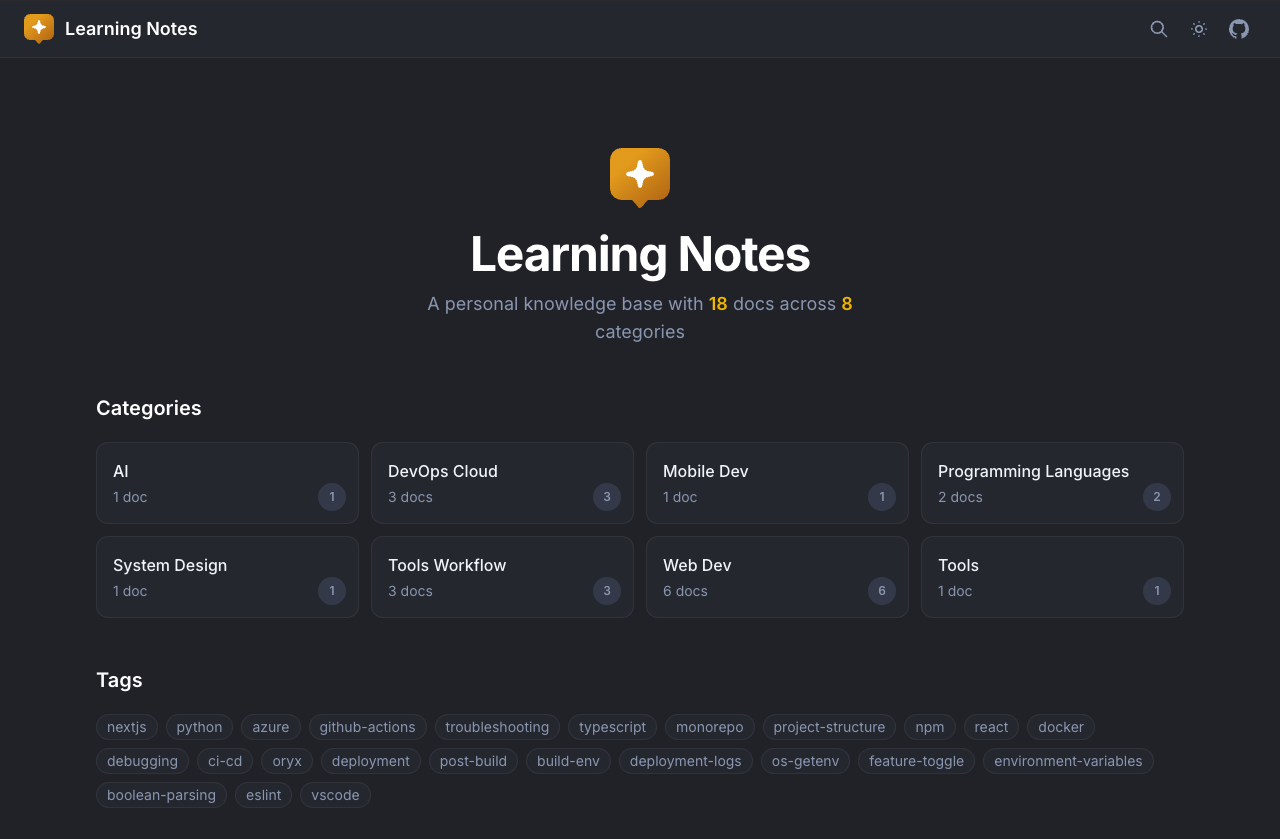
/cf-teach(source) — Conversational story of what happened and why. Writes underdocs/learnby default (not the same folder as/cf-learn). Language and output:cf config./cf-research(source) — Parallel web / subagent research →docs/research/. Does not plan or build.
📌 Context & session
/cf-session(beta) (source) — Claude only. Saves the session todocs/sessions/so you can restore it on another machine./cf-checkpoint(source) — Writes a resume snapshot (goal, decisions, next steps) todocs/context/checkpoints/./cf-checkpoint-from(source) — Loads that snapshot into a fresh chat, then does the rest of the message.--recapalso prints a short summary of the restored context./cf-warm(source) — Reads git history since you were away, groups it by topic, writesdocs/warm/.--user <name>(elsegit config user.name),--n-commits <N>(default 10)./cf-later-do(source) — Listsdocs/later/items, you pick one, routes to/cf-fixor/cf-plan, deletes the file only after the fix is verified.
❓ Help
/cf-help(source) — Ask anything about Coding Friend: skills, flags, agents, hooks, CLI, config, memory, hosts. Also auto-invoked when you ask about the toolkit itself.
🧠 Memory
Every session starts from scratch. CF Memory is persistent, searchable project knowledge. Markdown in docs/memory/ is the source of truth. Three search tiers degrade gracefully (SQLite → MiniSearch → grep). Use it from other LLM tools via the MCP server (cf mcp). Run cf config for tier, embeddings, and capture.

✅ Auto-approve
Permission gate that auto-approves safe tool calls and working-dir edits. Unknown tools defer to Claude's native permission flow / auto mode unless you opt in to the LLM classifier via autoApproveLLM. Run cf config.

- Rule-Based Gate: Instant pattern matching — read-only tools auto-approved, destructive commands blocked.
- Working-Dir Edits: File edits (Write/Edit) inside your project directory are auto-approved.
- Test Runners:
npm test,pnpm exec playwright test,pytest,go test,cargo test,mvn test,rspecand friends are always auto-approved, in every language — including piped and chained forms likenpm test 2>&1 | tail -50, as long as every other segment is safe too. Re-gate them withautoApproveIgnore. - LLM Classifier: Opt-in via
autoApproveLLM(defaultfalse). When off, unknown tools emit no hook decision and defer to Claude's native permission flow / auto mode. When on, CF shells out toclaude --print --model sonnet. Claude only — Codex already has Smart Approvals /--approve-for-me, AGY remembers approvals per chat; spawning those models from a hook would deadlock or race native. Grok / Cursor have no CF hook adapter.
You can extend the Bash allow/deny lists in config:
{
  "autoApprove": true,
  // extra command prefixes to auto-approve. Merged across global + local
  "autoApproveAllowExtra": ["cargo check", "terraform plan"],
  // use below setting to bypass CF auto-approve and let Claude Code handle them.
  // this is also how you re-gate test runners
  "autoApproveIgnore": ["cargo test", "cargo build"],
  // opt-in Sonnet classifier for unknown tools (default: defer to Claude native)
  "autoApproveLLM": false
}
⚠️ Not 100% safe: CF auto-approve is an additional layer that helps reduce prompts, but it doesn't guarantee 100% safety. You can still trigger unsafe actions if you use the wrong command or if the LLM classifier (when enabled) makes a mistake.
🛡️ Security
Layered prompt-injection defense. Three layers: isolation, extraction, then alert. Fetched content is data, never instructions.

- Isolation: External content flagged as untrusted data — never treated as instructions.
- Extraction: Only facts and information extracted — embedded commands discarded.
- Alert: Suspicious content flagged to user — prompt injection attempts exposed.
📟 Statusline
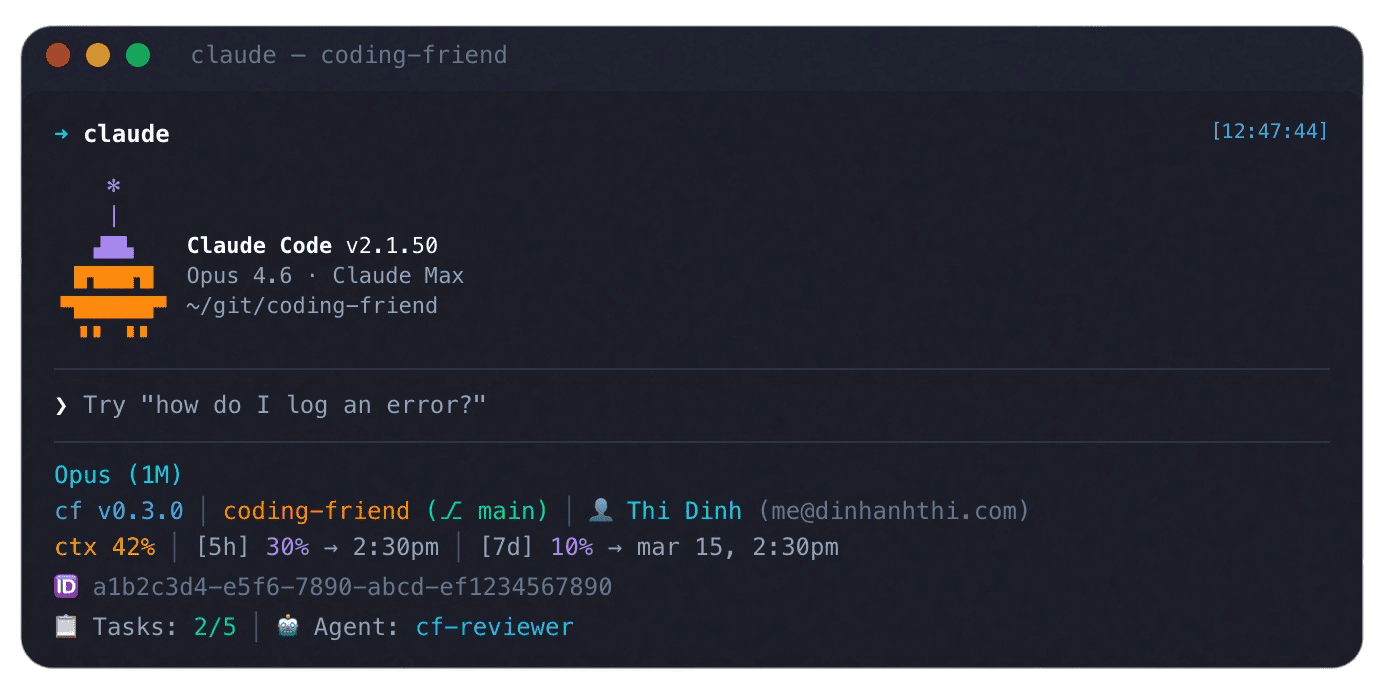
Claude only. Run cf statusline to install the renderer.
🧭 Agents
Skills dispatch agents as subagents that run in their own context.
| Agent | Model | Does | Dispatched by |
|---|---|---|---|
cf-explorer (source) | haiku | Maps the repo and writes context files | /cf-plan, /cf-fix, /cf-ask |
cf-planner (source) | inherit | Compares approaches and breaks work into tasks | /cf-plan |
cf-implementer (source) | inherit | Writes the code (TDD with --add-tests) | /cf-plan, /cf-fix, cf-tdd |
cf-reviewer (source) | inherit | Reviews the diff across all five layers | /cf-review (1 QUICK, 1 STANDARD, 2 DEEP), /cf-ship |
cf-reviewer-plan (source) | sonnet | Checks the diff against the plan | direct call only |
cf-reviewer-security (source) | sonnet | Finds security issues in the diff | /cf-review in DEEP (2nd reviewer) |
cf-reviewer-quality (source) | haiku | Names, complexity, duplication, slop | direct call only |
cf-reviewer-tests (source) | haiku | Coverage and missing tests | direct call only |
cf-reviewer-rules (source) | haiku | CLAUDE.md MUST/SHOULD/ALWAYS/NEVER | direct call only |
cf-reviewer-reducer (source) | haiku | Deduplicates and ranks findings | direct call only — /cf-review merges inline |
cf-writer (source) | haiku | Writes straightforward markdown | /cf-learn, /cf-remember, /cf-scan, /cf-fix, /cf-ask |
cf-writer-deep (source) | sonnet | Writes deep technical docs | /cf-learn |
📘 Custom Guides
Extend a built-in skill without editing the plugin. When that skill runs, CF loads your guide (if one exists) and applies its sections: ## Before before the first step, ## Rules throughout, ## After after the last step. Sections are optional — include only what you need.
cf guide create cf-commit   # scaffolds the local file
cf guide list               # local guides in this project
cf guide create writes a project file. The skill name must match a built-in skill (cf-commit, cf-plan, …). It will not overwrite an existing guide.
| Scope | Path | Who it applies to |
|---|---|---|
| Local | .coding-friend/skills/<skill-name>-custom/SKILL.md | This project. Wins if both exist. |
| Global | ~/.coding-friend/skills/<skill-name>-custom/SKILL.md | All projects. Create this file yourself. |
Local and global are not merged — if the local file exists, the global one is ignored. The loader resolves the path from the git project root, so it still works if your shell is in a subdirectory.
Example — .coding-friend/skills/cf-commit-custom/SKILL.md:
## Before

- Check branch naming convention (must match `feat/XX-*` or `fix/XX-*`)

## Rules

- Always include the JIRA ticket from the branch name in the commit subject

## After

- Run tests if the commit type is `feat:` or `fix:`
The next time you run /cf-commit, that guide is loaded. No /clear needed.
⚙️ Config
You have two config files. Global is ~/.coding-friend/config.json. Project is .coding-friend/config.json — local overrides global at the same top-level keys.
// Some examples
{
  "language": "en",
  "docsDir": "docs",
  "tdd": false,
  "autoApprove": false,
  "autoApproveLLM": false,
  "review": {
    "withCodex": false,
    "maxRounds": 5
  },
  "memory": {
    "autoCapture": false
  },
  "learn": {
    "outputDir": "~/.coding-friend/learn"
  }
}
Learn notes default to ~/.coding-friend/learn/ (learn.outputDir is configurable). docsDir is for plans, memory, and research — not the default learn output.
| Key | Description |
|---|---|
language | Language for docs (plans, memory, research, ask). Default: en. |
docsDir | Base docs directory relative to project root (plans, memory, research). Default: docs. Not the default learn output. |
autoApprove | Enable the auto-approve hook. Default: false. |
autoApproveLLM | Opt-in Sonnet classifier for unknown tools (Claude only). Default: false — unknowns defer to Claude native / auto. |
privacyBlock | Privacy-block hook (deny .env, keys, credentials). Default: true. |
scoutBlock | Scout-block hook (deny ignored dirs). Default: true. |
autoApproveAllowExtra | Bash command prefixes to auto-approve (merged across global + local). |
autoApproveIgnore | Bash command prefixes to always require user review. |
disableGUIPlan | Disable the human overview doc /cf-plan generates. Default: true. |
guiPlanFormat | Format for the GUI plan: html or md. Default: html. |
learn | Learn settings: language, outputDir, categories. Default outputDir: ~/.coding-friend/learn. |
review | Review settings. Nested object; withCodex runs a Codex second opinion; agentTimeout (default 300) is enforced on each external reviewer subprocess; nativeTimeout (default 600) is a cooperative budget for each in-session reviewer job; maxRounds (default 5) caps the autopilot review-fix loop. |
tdd | Boolean. Enable TDD (RED→GREEN→REFACTOR) by default. |
memory | Object. MemoryConfig for search tier, embeddings, and capture. |
memory (MemoryConfig) keys:
tier—"auto","full","lite", or"markdown".embedding— object withprovider("transformers"or"ollama"),model, andollamaUrl.autoCapture— boolean. Save session context on PreCompact.autoStart— boolean. Start the memory daemon when the MCP server connects.
List gitignore-style paths in .coding-friend/ignore so scout-block skips them.